
Guide
How to monitor newsrooms and press releases
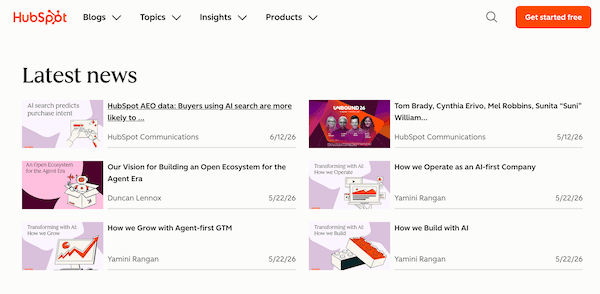
A company posts a press release at 7:12am. Nobody emails your channel. By the time the wire, the newsletter, or a colleague's Slack link shows up, the announcement has already moved markets, filled inboxes, and set the narrative. The job here is narrower than "follow the news": when a company's own newsroom, IR announcements page, or press-release index adds something material, the alert should land where investors, PR, journalists, and competitive intel already work, with a plain-language summary you can triage from. Example shape: Change detected on https://www.hubspot.com/newsroom: A new article was published: "HubSpot AEO data: Buyers using AI search are more likely to…"
Free plan · 10 monitored URLs or sitemaps · AI included · PDF support · No credit card required
Tell Page Deltas what matters
alert me when Hubspot publishes a new article
🔔 Change detected on https://www.hubspot.com/newsroom:
A new article was published — “HubSpot AEO data: Buyers using AI search are more likely to…”
Why newsrooms need their own monitors
A homepage monitor will not do this job. Cookie banners, nav chrome, featured-story carousels, and "related coverage" widgets are real diffs. They are not a new acquisition release, an exec appointment, an earnings note, or a product launch that just hit the press page. Newsrooms publish on their own schedule and list each release at its own URL. Teams that try to watch "the whole corporate site" with one vague brief recreate a visual-diff firehose inside Slack (or bury the signal in a shared alerts@ inbox). The product overview for this desk lives on our newsroom and press release monitoring use case. This post is the setup: which URLs to paste, what to ask for, what to ignore, and how the path differs from a selector-and-diff workflow.
The moves that actually matter
A new press release or newsroom article appears on a company press index. An IR announcements or investor news page posts M&A, earnings, guidance, or leadership language. A PDF media kit, filing attachment, or release PDF gains a section you care about. A newsroom sitemap gains a new release URL under press or news paths. A competitor or portfolio company rewrites or quietly revises an existing release (wording that changes after the first post).
What to ignore on purpose
Homepage carousels, cookie banners, nav and footer chrome, social share counts, "related stories" sidebars, unrelated blog posts, and "last updated" stamps with no new release. If you do not name those in the brief, the hash will still see them as changes and you will spend week one editing ignore clauses.
Newsroom monitoring use case
Product framing for investors, PR, journalists, and competitive intel: primary-source newsrooms, AI topic filtering, sitemap discovery for new releases, PDF media kits, and alerts in Slack or a signed webhook.
Newsroom monitoring →How this differs from a Visualping-style press-release watch
Classic website monitors in the Visualping family are built around "something on the screen moved." Their press-release tracker walkthrough typically has you paste the press page, pick a region around the top of the release list, optionally add keywords, set a fixed check interval (from minutes to monthly), then get email (or Slack on higher tiers) when that region changes. Material triage often needs another step to decide whether the release is M&A, routine CSR, or noise. That path works if you want to operate a monitoring-and-diff rig with per-page typed frequencies. Page Deltas asks a different question on the public web. Paste the public newsroom URL, IR announcements page, press-release PDF, or newsroom sitemap, write a natural-language brief, and an LLM judges whether the change matches what you asked for. The alert opens with a summary plus before/after screenshots. No selector maintenance for the primary workflow. Cadence is adaptive (active pages more often, quiet ones less; paid plans get priority checking). Full plan-for-plan comparison lives on Page Deltas vs Visualping. This post is the newsroom-desk setup. PDF support matters here: media kits and some IR packs ship as downloadable PDFs, and selector tools are awkward on those files. Page Deltas reads public HTML and public PDFs with the same brief-and-summary loop.
Visualping-style path
Pick a region or selector on the press-release list, set a poll interval, often add keyword filters. Email (or Slack on higher tiers) inherits the diff-first model unless you build more.
Page Deltas path
Paste the public newsroom, IR announcements page, press PDF, or sitemap. Write the brief. Attach Slack / Discord / Teams / email / a signed webhook. AI filtering and summaries are on every plan, including Free. You still decide whether to react. The tool's job is to stop the PR firehose before it hits the channel. Public pages only; authenticated portals are on the roadmap.
Page Deltas vs Visualping →Setup: first newsroom alert in about five minutes
Same path as our how to monitor website changes walkthrough, scoped to press sources.
Pick the exact newsroom URL (not the marketing homepage)
HTTPS recommended. Public pages only. Prefer the company's own newsroom, press center, media room, or IR announcements index your team already refreshes, not the marketing landing page. If releases ship as a public PDF, paste the PDF URL itself. One source (or one PDF), one monitor. Point a sitemap monitor at a newsroom or press sitemap when you want newly posted release URLs without watching every individual release page by hand.
Create a free Page Deltas account
Sign up at pagedeltas.com/register. No credit card. Free plan: 10 monitored URLs or sitemaps, unlimited checks (best-effort frequency), AI filtering and summaries, unlimited teammates, Slack / Discord / Teams / email / signed webhooks, REST API and MCP, 14-day history.
Connect the channel where announcement triage already happens
Open Channels, then add Slack, Microsoft Teams, or Discord via an incoming-webhook URL (or email / signed webhook). Click Send test. Do the test. A working monitor with a silent channel is how people decide the product is broken. Most teams use something like #newsroom, #ir-alerts, or #competitive-intel, not a private inbox. Full Slack wiring is in How to get website change alerts in Slack.
Create the monitor with a real brief
Click New monitor. Paste the newsroom URL, IR page, PDF, or sitemap. Write the description like a brief, not a search query. Three pieces: what the page is, which announcement types matter, what to ignore. Example (competitor newsroom): Competitor newsroom / press center. Alert me when a new release is posted about acquisitions, leadership changes, earnings, or product launches. Ignore cookie banners, related-story widgets, nav chrome, and CSR / community ribbon-cuttings. Summarise the headline and announcement type in one or two sentences.
Let the first check establish the baseline
A new monitor is due immediately. The first check stores the fingerprint. You should not expect a "new acquisition release" alert on minute one unless the page actually changed between two checks in a way that matches the brief. Use Check now after you tighten the brief.
Copy-paste briefs for common newsroom jobs
Steal the shape. Swap the companies and topics. Vague briefs ("tell me when this changes") recreate a visual-diff firehose on a busy press index.
Competitor or portfolio newsroom
[Company] newsroom / press center. Alert me when a new press release or newsroom article is posted about [M&A / leadership / earnings / product / your keywords]. Ignore cookie banners, related coverage widgets, nav chrome, and routine CSR posts. Summarise the headline and announcement type.
Investor relations / announcements page
[Company] IR announcements or investor news page. Alert me when a new release posts about earnings, guidance, M&A, capital markets activity, or board / executive changes. Ignore calendar widgets and footer chrome. Summarise the title and whether it looks material.
Topic-filtered newsroom (mute routine PR)
[Company] newsroom. Alert me only for releases that mention [acquisition, merger, CEO, CFO, earnings, Series, product launch, partnership with named competitors]. Ignore community events, award roundups, and unrelated blog posts. Summarise why it matched.
Press-release PDF or media kit
Public press-release PDF or media kit for [Company / topic]. Alert me when new sections, named parties, deal terms, or product claims are added or reworded. Ignore cover branding and pure formatting. Summarise the section family and direction of change.
Newsroom sitemap for new release URLs
[Company] newsroom or press sitemap. Alert me when a new URL appears under news, press, or media paths. Ignore unrelated site sections if the sitemap is broad. Summarise the new URL path and title if present.
Revised release (wording after first post)
[Exact release URL]. Alert me when the body text, headline, quotes, or figures change after the original post. Ignore share buttons and related-links chrome. Summarise what was added, removed, or reworded.
What else to watch (without stuffing one monitor)
Newsrooms are one slice of primary-source intel. Pair them deliberately. Do not dump everything into one brief.
Newsroom index vs individual release vs sitemap
Put the "new release posted" brief on the newsroom or IR index. Put a sitemap monitor on the press sitemap when you care about every new release URL. Put a dedicated monitor on a specific release URL only when you need to catch quiet revisions after publication. One vague monitor on the whole corporate domain either fires constantly or misses the PDF media kit.
Regulatory and RFP pages (different desks)
Rulemaking and tenders are not press. When the signal is an amended rule or a new solicitation, use the regulatory compliance or government RFPs and tenders setup, not a newsroom brief.
How to monitor regulatory compliance changes →Changelogs and product docs (different desk)
When the signal is a feature entry or deprecation rather than a press announcement, that is the changelog and release notes workflow.
How to monitor competitor changelogs and release notes →Signed webhook / API into media or CRM stacks
If the alert should open a row in your media-monitoring stack, CRM, or newsroom log instead of (or as well as) pinging humans, use a signed webhook or the REST API. Pipe the summary into the system of record; keep the human decision there.
How to turn any website into a change API →Optional: media and social reaction
Page Deltas watches the primary source page. If you also need keyword mentions of the same announcement across LinkedIn, X, Reddit, Facebook, YouTube, and Hacker News after it drops, that is a sibling job on KWatch.io. If the signal is what a specific executive or company account posts on LinkedIn or X, that is MultiFollow.io. Use Page Deltas for the newsroom, KWatch for listening, MultiFollow for profiles.
Keep the channel useful after day one
Treat the brief as the product. A channel full of noise dies faster than an empty one.
One newsroom, one URL, one brief
Start with the 5 to 15 newsrooms that actually move your beat, portfolio, or competitive set. Expand later. Several specific monitors beat one vague monitor on "all PR."
Edit the brief, don't mute the channel
When an alert is noisy, open the summary, add an explicit ignore clause (for example, award roundups or community events), then click Check now. The new brief applies on the next check, not retroactively.
Thread the response
👀 reviewing, ✅ noted / pitched / no action, keeps #newsroom scannable. The alert is the start of triage, not a substitute for reading the release.
AI triage is not investment or editorial advice
The summary is meant to get a qualified reader to the right announcement faster. It does not replace reading the full release, checking figures, or deciding whether to trade, pitch, or respond.
Honest limits
Plans if you outgrow ten URLs: Starter $29 / 150 URLs, Pro $79 / 1,000, Business $199 / 5,000, Scale $499 / 20,000, Enterprise custom. AI, screenshots, all five alert channels, unlimited checks, and unlimited team members are included on every tier; paid adds priority checking and longer history. Free includes REST API and MCP.
Public pages only
Login-walled media portals, embargo rooms, and SSO investor sites are not supported yet. Authenticated monitoring is on the roadmap. Anything visible without signing in is fair game, including public newsrooms, public PDFs, and public press sitemaps.
Not a visual-regression tool
If the job is "did this pixel move 20px," a visual-diff product still wins. We strip nav/footer/ads and ask whether the leftover change matches your brief.
Not a wire service or media database
You get alerts, summaries, and before/after screenshots of versions captured while the monitor was on. That is useful for "what this company posted on Tuesday." It is not a scored news wire, a clip book, or a substitute for reading the full release.
Not LinkedIn or X activity
Page Deltas watches the open web. If the signal is an executive LinkedIn or X post rather than a public newsroom page, that is a different job (MultiFollow / KWatch).
Cadence is adaptive, not a typed five-minute poll
Check now is the escape hatch. Higher plans get scheduling priority. Quiet newsrooms may go days between posts; busy IR pages move around earnings. Adaptive cadence is usually enough once the brief is tight. For a known announcement window, use Check now and a dedicated monitor on the exact page that is expected to move.
Frequently asked questions
- How often should I check newsrooms?
- You do not type an interval in Page Deltas. Adaptive cadence checks active pages more often and quiet ones less. For newsrooms you care about on announcement days, that is usually enough; use Check now after a rumor, a scheduled earnings call, or a tip. Paid plans get scheduling priority for time-sensitive sources.
- Will it catch PDF media kits and release attachments?
- Yes, if the PDF is publicly reachable at a stable URL and your brief asks for the section families that matter. Paste the PDF URL as its own monitor. Pair a sitemap monitor when you need newly posted release URLs on a press index.
- Can I filter out routine PR?
- Yes. Name the announcement types that matter (M&A, leadership, earnings, product) and explicitly ignore CSR, awards, and community events. Tighten the brief after the first noisy week.
- Can I follow many companies at once?
- Yes. Create one monitor per newsroom (or per sitemap). Free covers 10 URLs; paid plans scale from there. Most teams start with the companies on their beat or competitive set, not every press page on the internet.
- Can I send different companies to different Slack channels?
- Yes. Add one incoming-webhook channel per destination under Channels, then attach the right ones per monitor (or leave unchecked to use org defaults).
- How is this different from Visualping's press-release tracker?
- That guide leans on region or selector targeting, fixed check frequencies, optional keywords, and diff-first email alerts. Page Deltas uses a natural-language brief, AI filtering/summaries on every plan (including Free), adaptive cadence, native Slack / Discord / Teams / email / signed webhooks, first-class public PDF monitoring, and sitemap discovery for new release URLs. Page Deltas does not monitor login-walled portals yet. Full comparison: Page Deltas vs Visualping.
- Is this a substitute for reading the release?
- No. It is a detection and triage layer so you spend time on material announcements instead of refreshing a dozen newsroom tabs. Final editorial, IR, or competitive response stays with your team.
Author
Julien, Product Manager at Page Deltas. Pick the one newsroom your team already refreshes before the morning standup. Paste that URL (or the press sitemap / release PDF), write the sentence you'd send the desk about which announcement types matter, connect the channel people already sit in, send a test, and wait for the first real match. Tighten the ignore list once. That is usually the whole newsroom setup.
Start with one newsroom
Free plan, no card. Create an account, paste the newsroom, IR page, or press sitemap you already babysit, drop in a brief from above, and route the alert to the channel where announcement triage already happens.