
Comparison · ChangeTower alternative
Page Deltas vs ChangeTower
Both watch web pages and alert you when something changes. ChangeTower has you define the criteria first: page areas, keyword rules, sensitivity levels, and a check schedule that depends on your tier. Page Deltas takes one plain English sentence and puts an AI in charge of judging every detected change against it. Alerts arrive in Slack or Teams with the summary already written, and every plan comes with unlimited checks and unlimited team members.
Free plan · 10 monitored pages or sitemaps · Premium AI included · No credit card required · Switch in minutes
Tell Page Deltas what matters
alert me when the Hubspot pricing changes
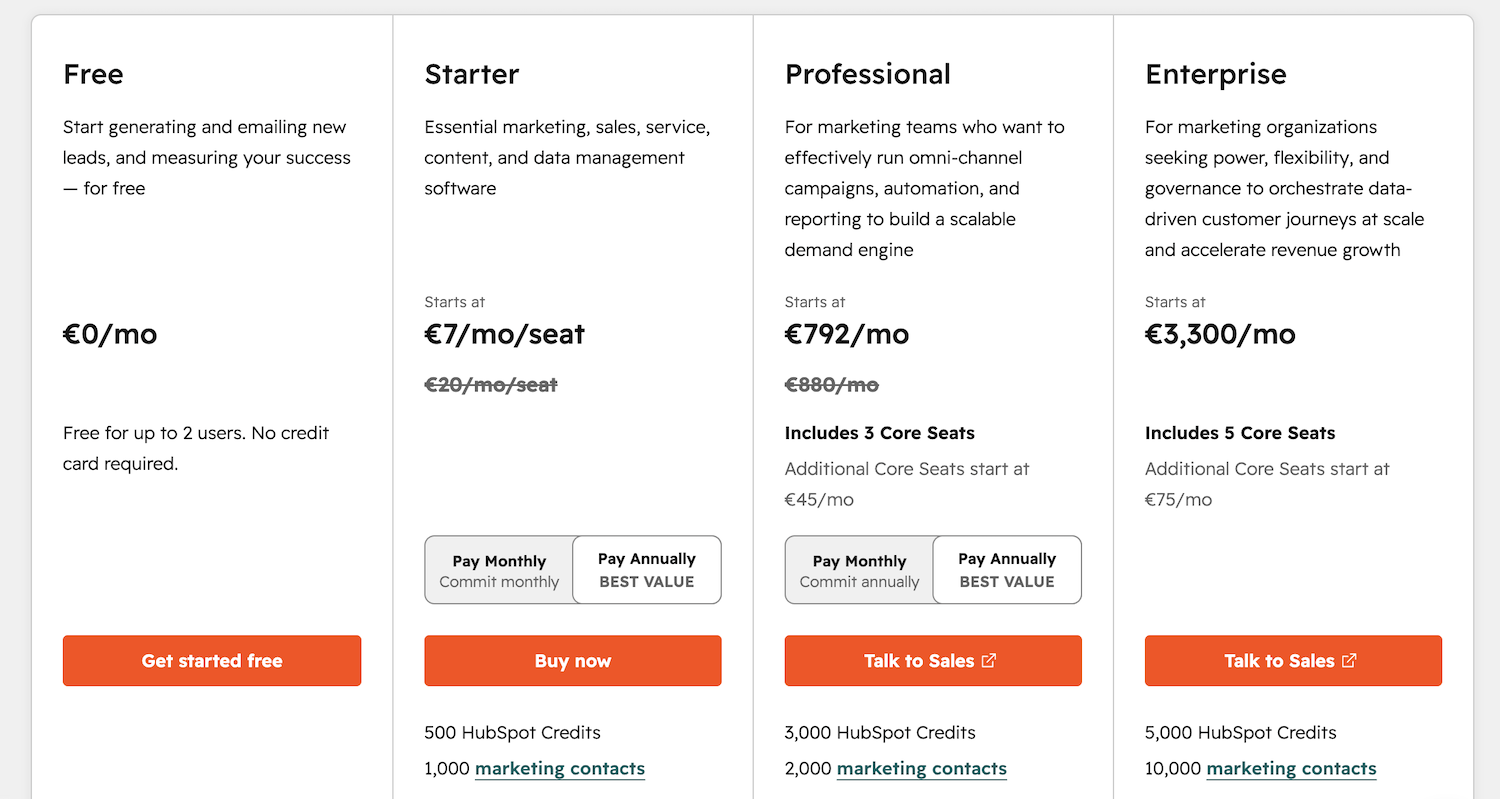
🔔 Change detected on https://www.hubspot.com/pricing:
Price of the Professional plan went up from €749/mo to €792/mo.
One sentence replaces the whole alert setup.
ChangeTower comes from the archiving side of monitoring, and that part runs deep: every monitor keeps snapshots you can search back through. The alerting side asks more of you. You choose a page area or write keyword rules, then set how sensitive the alert should be. After that you wait for the next check your tier allows; the free and Lite plans look once a day. Page Deltas starts with a sentence in plain English about what you want to catch. A language model reads each detected change against that sentence and throws out the noise. Whatever survives arrives summarized, in Slack, Teams, or wherever your team reads. Checks run as often as pages need on every plan, and every teammate gets a seat.
Head to head
How the two compare.
The first rows cover setup and filtering, then what the alert contains. Plan mechanics around checks, seats, and discovery follow below.
| Page Deltas | ChangeTower | |
|---|---|---|
| Setting up a watch | Describe what matters in plain English | Select page areas, keywords & code; set sensitivity |
| Noise filtering | AI suppresses cosmetic & irrelevant changes | Sensitivity levels & hand-built alert criteria |
| What the alert says | Plain-language AI summary of what changed | Change report with a highlighted diff to interpret |
| Check frequency | Unlimited checks on every plan | Daily on Free & Lite, hourly on Essential, every 20 min on Business |
| New-page discovery | Sitemap monitoring auto-detects new URLs | Domain scanning reserved for Enterprise |
| Where alerts land | Slack, Teams, Discord, signed webhook & email built in | Email built in; Slack via channel email address or Zapier |
| AI agents | MCP server — create monitors and read changes from Claude, Cursor, VS Code | No MCP |
| Team access | Unlimited team members on every plan | Extra seats counted per tier (1 on Lite, 5 on Business) |
| Best fit | Teams who want the reading done for them | Teams archiving page history & tuning alert criteria |
Price for price
More pages per dollar at every step.
Premium AI, unlimited checks, unlimited team members, and native Slack and Teams delivery come with every Page Deltas plan, the free one included. ChangeTower prices capacity and speed together, so a bigger budget buys more pages and a shorter check interval at the same time. At the closest match-up, 100 pages checked hourly cost $36 a month there, and $29 here covers 150 pages with no cap on checks.
| Page Deltas | ChangeTower | |
|---|---|---|
| Free plan | 10 pages or sitemaps · unlimited cloud checks · premium AI filtering & summaries · unlimited users · Slack & Teams included | 3 pages · one check per day · 1 extra team member · 30-day history · email alerts |
| The mid tiers | $29/mo: 150 pages or sitemaps · unlimited checks · premium AI · unlimited users · Slack & Teams included | $36/mo (Essential): 100 pages · hourly checks at most · 3 extra team members · 60-day history |
| Around $80/mo | $79/mo: 1,000 pages or sitemaps · unlimited checks · premium AI · unlimited users · Slack & Teams included | $78/mo (Business): 200 pages · checks every 20 minutes at most · 5 extra team members · 6-month history |
ChangeTower figures come from their published Pricing page (Free, Lite $12/mo, Essential $36/mo, and Business $78/mo, billed monthly) as of July 2026 and may change. Page Deltas plans shown are Free, Starter ($29/mo), and Pro ($79/mo); the Business plan covers 5,000 pages or sitemaps for $199/mo, and the pricing page lists every tier.
What you get when the AI does the reading.
Six differences you notice in the first week.
Describe it in plain English
Setting up a ChangeTower monitor means picking a page area or building keyword rules, then choosing how sensitive the alert should be. On Page Deltas you write a sentence, something like “tell me when their pricing or their plans change”, and that sentence becomes the whole setup.
AI filters the noise
Keyword and area criteria fire on whatever touches them, so a rotating testimonial or a refreshed timestamp can page you at midnight. Page Deltas passes each detected change to a language model that knows your instructions, and the cosmetic churn never reaches your channel.
AI tells you what changed
ChangeTower alerts link to a change report where the difference sits highlighted, waiting to be read. A Page Deltas alert leads with plain language: “Pro plan went from $49 to $59 a month and the annual discount is gone.”
Checks without a speed tier
On ChangeTower, check frequency is a plan feature. Free and Lite tiers look once a day. Essential reaches hourly, and the $78 Business plan brings the interval down to 20 minutes. Page Deltas checks every plan's pages as often as they need, the free tier included.
Alerts where your team already reads
Reaching Slack from ChangeTower means forwarding alert emails to a channel address or building a Zapier workflow on its API token. Page Deltas posts to shared Slack, Teams, and Discord channels natively, alongside signed webhooks and email, on every plan.
More pages per dollar
$29 a month covers 150 monitored pages or sitemaps here; ChangeTower's closest plan is Essential, 100 pages at $36. At the next step up, $79 buys 1,000 pages against 200 for $78 on their Business plan. Free plans compare at 10 pages against 3.
Why it's different
Built after language models learned to read.
ChangeTower grew out of web archiving, and the archive side shows it: snapshots pile up behind every monitor, ready to be searched. Alerting still works the way it did before language models could read. You encode your intent as criteria, and every alert asks you to interpret a diff. Page Deltas was built after that changed. Your instruction stays a sentence. The model reads each change against it and writes the alert, which is also why the plans skip check schedules and seat counts entirely.
- ✓Plain English instructions in place of keyword and area criteria
- ✓AI screening on every check, tuned by what you wrote
- ✓Alerts that lead with a written summary of the change
- ✓Unlimited checks and unlimited team members on every plan
- ✓MCP server so AI agents can create monitors and read changes
Switching from ChangeTower takes minutes.
Bring the URLs you already watch and skip rebuilding the criteria. A sentence per page does that job here.
Add the same pages
Paste in the URLs you monitor today, or bring the whole list over with bulk import. A sitemap URL counts as a single entry and covers every page inside it.
Write one sentence per concern
Where ChangeTower wanted criteria and a sensitivity level, you type the change you want to hear about. That sentence gets applied by AI on every check from then on.
Read the summary, act on it
When something qualifies, the alert reaches your channel with before and after screenshots and a written account of what changed.
The pages people point ChangeTower at work here too.
Anything public on the web qualifies. These six come up the most.
Competitor pricing pages
Price moves and new tiers reach your channel with the numbers spelled out.
See competitor pricing monitoring →Competitor websites
Homepage messaging and product pages across a rival's whole site, watched from one place.
See competitor website monitoring →New pages via sitemap
Point us at a sitemap.xml and hear about brand-new URLs as they appear.
See SEO & content monitoring →Terms of Service & legal
Vendors change their terms quietly. You find out the same day.
See Terms of Service monitoring →Regulatory & compliance
Rule changes from the SEC, the FDA, the FCC, and other regulators, summarized as they land.
See regulatory monitoring →Changelogs & release notes
Competitor releases and vendor status pages, followed without keeping tabs open.
See changelog monitoring →Frequently asked questions
- Is Page Deltas a good ChangeTower alternative?
- Yes, if the job is knowing when a page changes in a way you care about. You describe that change in a sentence and AI reads every detected change against it, so there are no criteria to build. At matched capacity the pricing favors switching too: $29 a month covers 150 pages here, and ChangeTower's $36 Essential plan covers 100. Teams pick up native Slack and Teams delivery along with unlimited seats. If long-term page archiving is the job instead, ChangeTower keeps the edge there.
- What's the main difference between Page Deltas and ChangeTower?
- Who reads the change. ChangeTower has you decide in advance what counts, through selected areas, keyword rules, code criteria, and sensitivity settings, and its alerts hand you a highlighted diff to interpret. Page Deltas moves that judgment to a language model. It takes your one-line instruction and weighs each detected change against it, and the alert states what happened in plain language.
- Is Page Deltas cheaper than ChangeTower?
- At matched capacity it is. ChangeTower's Essential plan covers 100 pages for $36 a month with hourly checks at the fastest, while $29 on Page Deltas covers 150 pages with no cap on checks. Near $80 the gap widens: 1,000 pages for $79 here, 200 pages for $78 on their Business plan. ChangeTower's $12 Lite tier is the cheaper absolute entry point, holding 25 pages checked once a day. The Page Deltas free plan starts you at 10 pages with premium AI included and no card.
- Can I move my existing ChangeTower monitors over?
- Paste the same URLs in, or bring the whole list at once with bulk import. A sitemap URL works as a single entry too. Keyword rules and area selections have nothing to be rebuilt into here, since a one-sentence instruction takes their place, and moving a typical watchlist takes a few minutes.
- Which alert channels does Page Deltas support?
- Slack, Microsoft Teams, Discord, signed API webhooks, and email, all native on every plan including the free one. ChangeTower sends email out of the box and reaches Slack by forwarding alerts to a channel's email address or through a Zapier workflow connected with its API token. Zapier can carry its alerts to SMS as well, which Page Deltas has no equivalent for today.
- Does Page Deltas archive page history or monitor uptime?
- Page Deltas keeps before and after screenshots plus a change history for every monitor, retained for 14 days on the free plan and up to two years on the top tier. ChangeTower grew out of archiving and goes deeper there: its Business plan holds six months of snapshots, and Enterprise adds full-page archiving with domain scanning. ChangeTower also checks website uptime, which Page Deltas leaves to dedicated uptime tools. If a compliance archive or uptime coverage is the primary job, ChangeTower fits that better today.
Get alerts that explain themselves.
Add the pages you watch today and write a sentence about what matters on each. AI reads every change from then on, and the free plan covers your first ten pages without a card.