
Comparison · Visualping alternative
Page Deltas vs Visualping
Both watch web pages for changes. The difference is what happens when a page changes: Visualping shows you a diff to read; Page Deltas uses AI to decide whether the change matters and tells you what it means — in plain language, in the channel you already work in. And price for price, Page Deltas costs less at every tier while including more.
Free plan · 10 monitored pages or sitemaps · Premium AI included · No credit card required · Switch in minutes
Tell Page Deltas what matters
alert me when the Hubspot pricing changes
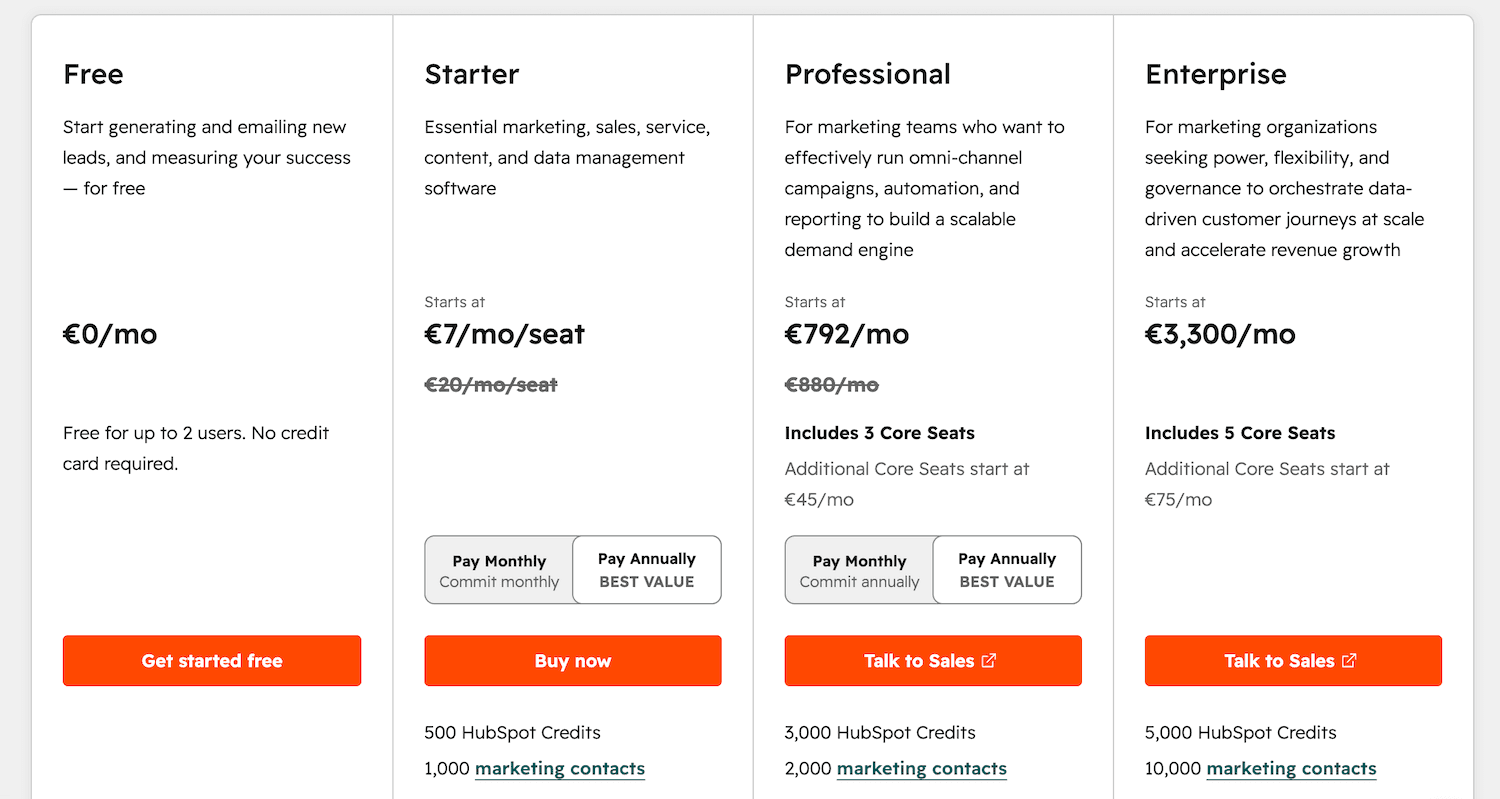
🔔 Change detected on https://www.hubspot.com/pricing:
Price of the Professional plan went up from €749/mo to €792/mo.
Change detection has moved on.
Visualping pioneered website change detection, and pixel-and-text diffing was the right tool a decade ago. But most teams don't want to know that something changed — they want to know whether it matters and what it was. Page Deltas is built around that question: you describe what you care about in plain English, an LLM filters out the noise, and every alert arrives already summarized. It also costs less. Plan for plan, Page Deltas undercuts Visualping's published pricing while including the AI, the integrations, and the unlimited checks and users that Visualping gates to bigger tiers — or doesn't offer at all.
Head to head
How the two compare.
Same job — watch a page, get told when it changes. A different philosophy about what a useful alert looks like — and a different bill at the end of the month.
| Page Deltas | Visualping | |
|---|---|---|
| Setting up a watch | Describe what matters in plain English | Pick CSS selectors or pixel regions by hand |
| Noise filtering | AI suppresses cosmetic & irrelevant changes | Fires on any visual or text diff |
| What the alert says | Plain-language AI summary of what changed | A highlighted diff you read and interpret |
| New-page discovery | Sitemap monitoring auto-detects new URLs | One page added and configured at a time |
| Where alerts land | Slack, Teams, Discord, signed webhook & email | Email, with some integrations on higher tiers |
| AI agents | MCP server — create monitors and read changes from Claude, Cursor, VS Code | No MCP |
| What it costs | Less at every price point — AI, integrations & unlimited checks included | More money for fewer pages; AI and integrations reserved for top tiers |
| Best fit | Teams who want signal, not a wall of diffs | Spotting that a page changed at all |
Price for price
More monitoring for less money, at every price point.
Every Page Deltas plan — the free one included — comes with premium AI filtering and summaries, unlimited checks, unlimited team members, and Slack & Teams delivery. Visualping charges more at every comparable tier and still holds those features back. And the 300 pages Visualping sells for $210/mo? Page Deltas covers 1,000 for $79.
| Page Deltas | Visualping | |
|---|---|---|
| Free plan | 10 pages or sitemaps · unlimited checks · premium AI filtering & summaries · unlimited users · Slack & Teams included | 5 pages · 150 checks per month · no AI · 1 user · no Slack or Teams |
| Around $30/mo | $29/mo — 150 pages or sitemaps · unlimited checks · premium AI · unlimited users · Slack & Teams included | $35/mo — 20 pages · 5,000 checks per month · no AI · 1 user · no Slack or Teams |
| Around $200/mo | $199/mo — 5,000 pages or sitemaps · unlimited checks · premium AI · unlimited users · Slack & Teams included | $210/mo — 300 pages · 30,000 checks per month · basic AI only · 7 users · Slack & Teams |
Visualping figures are from their published Plans & Pricing page (free, $35/mo, and $210/mo tiers) as of July 2026 and may change. Page Deltas plans shown are Free, Starter ($29/mo), and Business ($199/mo); the Pro plan covers 1,000 pages or sitemaps for $79/mo — see the pricing page for every tier.
What you get with Page Deltas that you don't with a classic diff tool.
Six things that turn change monitoring from a source of busywork into a source of signal — for less money, not more.
Describe it in plain English
No CSS selectors, no pixel regions, no per-element configuration. Tell Page Deltas “alert me when their pricing or positioning changes” and we monitor for exactly that. Setup is a sentence, not a tutorial.
AI filters the noise
Cookie banners, rotating testimonials, and timestamp tweaks get ignored. An LLM checks every detected change against your instructions, so a redesigned footer never wakes you up — only a change that matches what you asked for does.
AI tells you what changed
Every alert opens with a plain-language summary — “Pro plan went from $49 to $59/mo and the annual discount was removed” — instead of a highlighted diff you have to read and interpret yourself.
Delivered where you already work
Route alerts to Slack, Microsoft Teams, Discord, a signed webhook, or email. Your monitoring loop happens in the channel your team already lives in, not a separate inbox.
Cheaper at every price point
Line the published plans up and Page Deltas costs less every time: $29/mo buys 150 monitored pages or sitemaps versus 20 pages for $35/mo on Visualping, and $199/mo buys 5,000 versus 300 for $210/mo. Even the free plans aren't close — 10 pages with premium AI on Page Deltas, 5 pages with no AI on Visualping.
Nothing to meter, nothing to ration
Every Page Deltas plan has unlimited checks and unlimited team members. No 150-checks-a-month allowance, no 5,000-check quota, no single-seat plans — your limit is how many pages you watch, never how often we check them or how many colleagues see the alerts.
Why it's different
Built for the era of AI, not pixel diffs.
Older website change detectors notice that something changed. Page Deltas understands whether it matters and what it means. You describe the change you care about in plain English, an LLM does the judging, and your alert arrives pre-summarized — so a tool that used to generate busywork now saves it. That efficiency shows up in the price, too: every Page Deltas plan undercuts the comparable Visualping tier while including more.
- ✓Natural-language monitoring instead of CSS selectors and pixel regions
- ✓AI filtering that suppresses cosmetic and irrelevant changes
- ✓A written summary of every change, not just a highlighted diff
- ✓Slack, Teams, Discord, webhook, and email delivery built in
- ✓MCP server so AI agents can create monitors and read changes
Switching from Visualping takes minutes.
Bring the pages you already watch and let Page Deltas do the judging — your current Visualping budget covers several times the pages here.
Add the same pages
Paste in the URLs you currently monitor in Visualping — pricing, homepages, product pages, or a whole sitemap. No per-element selectors to recreate.
Say what matters in plain English
Instead of configuring regions and sensitivity, type the changes worth interrupting you for. Page Deltas turns that into an AI filter applied on every check.
Get summaries, not diffs
When something material changes, we ping your channel with an AI summary and before/after screenshots — so you act on the change instead of decoding it.
Everything teams use Visualping for — and then some.
Anything public on the web. These are the pages teams watch most.
Competitor pricing pages
Catch price hikes, new tiers, and discount changes the moment they ship.
See competitor pricing monitoring →Competitor websites
Track positioning, homepage messaging, and product pages across a rival's whole site.
See competitor website monitoring →New pages via sitemap
Point us at a sitemap.xml and get alerted when brand-new URLs appear — a launch, an integration, a new page.
See SEO & content monitoring →Terms of Service & legal
Know when a vendor quietly changes their ToS or privacy policy.
See Terms of Service monitoring →Regulatory & compliance
Track rule changes from the SEC, FDA, FCC, and other regulators.
See regulatory monitoring →Changelogs & release notes
Follow competitor releases, vendor changes, and status pages without checking them by hand.
See changelog monitoring →Frequently asked questions
- Is Page Deltas a good Visualping alternative?
- If you use Visualping to know when a page changes, Page Deltas does the same job and adds an AI layer on top: you describe what matters in plain English, an LLM filters out cosmetic noise, and every alert comes with a written summary of what actually changed. Teams who were drowning in diff alerts tend to switch for the filtering and the summaries — and stay because the bill is smaller: Page Deltas is cheaper than Visualping at every published price point.
- What's the main difference between Page Deltas and Visualping?
- Classic change detectors fire on any pixel or text diff, so you get alerts about rotating banners, timestamps, and redesigns. Page Deltas asks a different question: does this change match what you asked to be told about? You describe the change in natural language, an LLM decides whether it qualifies, and the alert arrives pre-summarized — signal instead of noise.
- Is Page Deltas cheaper than Visualping?
- Yes — at every published price point, while including more. Free: Page Deltas monitors 10 pages or sitemaps with unlimited checks, premium AI, and unlimited users; Visualping's free plan covers 5 pages with 150 checks a month, one user, and no AI. Around $30: Page Deltas' $29/mo plan covers 150 pages or sitemaps with everything included; Visualping's $35/mo plan covers 20 pages with a 5,000-check quota, one user, no AI, and no Slack or Teams. Around $200: Page Deltas' $199/mo plan covers 5,000 pages or sitemaps with premium AI and unlimited users; Visualping's $210/mo plan covers 300 pages with a 30,000-check quota, basic AI, and 7 users.
- Can I move my existing Visualping watches over?
- Yes — just paste in the same URLs you already monitor. There are no CSS selectors or pixel regions to recreate; you replace that setup with a one-sentence instruction describing what you want to be alerted about. Most people move their watches over in a few minutes.
- Which alert channels does Page Deltas support?
- Slack, Microsoft Teams, Discord, signed API webhooks, and email. Most teams route alerts into a shared channel so everyone sees the change at once, rather than relying on a separate inbox.
- Does Page Deltas monitor pages behind a login?
- Not yet — Page Deltas monitors the public web, which covers the vast majority of pricing, marketing, docs, legal, and product pages teams watch. Authenticated monitoring is on the roadmap.
Get the alert that tells you what changed.
Bring the pages you already watch, describe what matters in plain English, and let AI do the filtering and the summarizing. Set it up in a couple of minutes — and pay less than you're paying Visualping for a fraction of the coverage.