
Guide
How to monitor website changes
When people want to monitor a webpage, they usually refresh the same web page manually everyday until they notice something meaningful has changed. That works for one URL you already live in. It falls apart the moment you care about five pages, or the change you needed happened at 2am.
Free plan · 10 monitored pages or sitemaps · Premium AI included · No credit card required
Tell Page Deltas what matters
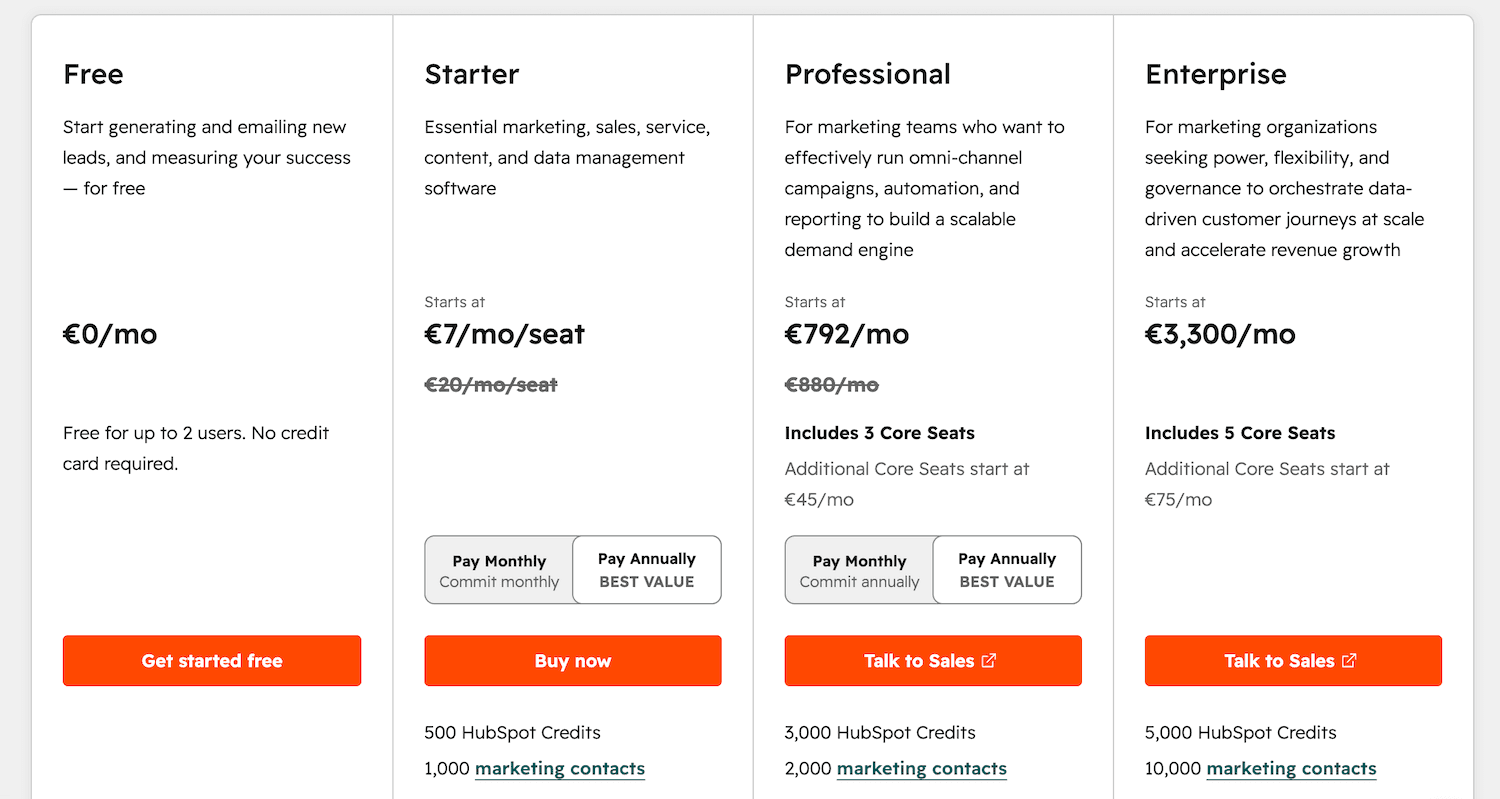
alert me when the Hubspot pricing changes
🔔 Change detected on https://www.hubspot.com/pricing:
Price of the Professional plan went up from €749/mo to €792/mo.
Start here if you have never used a change-detection tool
People bounce off this category because the vocabulary arrives before the job. Here is the job in one sentence: you pick a public page, you say what “matters,” and you get a message in Slack (or email, or a webhook) when that thing actually happens.
A monitor
One watched address plus your instructions plus a place to send alerts. In Page Deltas that address is a public URL, a sitemap.xml, or a PDF. You are not installing anything on the target site and you are not logging in as them. You are asking us to fetch what anyone on the open web can already see, compare it to last time, and ping you if it matches the brief.
A visual diff
A before/after picture of what moved: highlighted pixels, a boxed region, a redlined paragraph. Classic website monitors are built around that picture. You still have to read it and decide whether it matters. Right tool if the job is “tell me the banner moved.” Noisy tool if the job is “tell me when the Professional plan changes price.”
A sitemap
A file, usually at /sitemap.xml, that lists the URLs a site wants search engines to know about. New blog posts, product pages, and job URLs often show up there first. Watching a sitemap answers “did a brand-new URL appear,” not “did this URL get rewritten.” In Page Deltas a sitemap monitor counts as one URL against your plan, the same as a page monitor.
An LLM filter
A language model reading the change the way you would brief a teammate. LLM means large language model: the same kind of AI that can read two versions of a page and answer “did the price change, or did a testimonial rotate?” You type that brief in plain English. We do not ask you for CSS selectors or pixel regions.
A hash
A short fingerprint of the page text we extracted after stripping nav, footer, and ads. If today’s fingerprint matches the last one, the content we care about is the same: we stop, no LLM call, no alert. If the hash changed, we send the difference plus your description to the LLM and ask whether it matches the brief. Hash pass = did anything in the extracted text move? LLM pass = does that movement match the brief?
Adaptive cadence
You do not type a poll interval. You do not set “every 2 minutes.” We watch how often the page actually changes and check active pages more often, quiet ones less. Higher plans get scheduling priority when the queue is busy. If you want a run right now, that is what Check now is for.
A webhook
A URL on your side. When we have something to report, we send an HTTP request to that URL instead of (or as well as) posting in Slack. “Signed” means the request includes a signature, HMAC in our case, so your system can check that it came from us. Use a webhook when the alert should land in a CRM, a bid tool, a GRC system, or a script. Use Slack, Microsoft Teams, Discord, or email when a human should read it.
What you are actually trying to catch
The pages teams watch are public, and they are specific. A homepage is rarely the right URL. The pricing page, the careers board, the sitemap, the ToS, the procurement listing: those are the URLs where the signal lives. Same idea, different desks: a rival’s whole marketing site, a changelog, a regulator’s page. If the signal lives on LinkedIn or X rather than a web page, a website monitor will not see it. That is a different job.
Competitor pricing
Plan prices, quotas, new tiers, a free plan getting tighter, a public number turning into “contact us.” You want that the day it ships, not in a weekly recap.
Competitor pricing monitoring →New pages via sitemap
A launch, an integration page, a programmatic SEO rollout. Point a monitor at sitemap.xml and get told when brand-new URLs appear.
SEO & content monitoring →Hiring & careers pages
A new VP of Sales, a cluster of ML roles, a freeze. The careers page is a roadmap leak if you read it that way.
Hiring intelligence monitoring →Terms of Service & legal
Vendors rewrite ToS, privacy policies, DPAs, and SLAs on their own calendar. Often the only public tell is a bumped “last updated” date.
Terms of Service monitoring →Government tenders
Public RFP and tender pages, including PDF packs. A notice you never saw is a bid window you never had.
Government tender monitoring →Walkthrough: your first monitor, from a blank dashboard
Assume you have never used a change-detection tool. The first monitor should be a page you already refresh by hand. I will use a competitor pricing page, because that is the example we show on the site and because the brief is easy to write.
Create a free account
Sign up at pagedeltas.com/register. No credit card. The free plan is 10 URLs or sitemaps, unlimited checks, AI filtering and summaries, unlimited teammates, and the same channels as paid: Slack, Microsoft Teams, Discord, email, and a signed webhook. Your account is the first member of a new organisation and you start as admin. Ten slots sounds small until you remember a sitemap counts as one URL — you can watch ten whole publishing cadences, or ten pricing pages, or a mix.
Click New monitor and paste the exact URL
HTTPS is recommended. Public pages only: we cannot see anything behind a login, and authenticated monitoring is on the roadmap, not a hidden toggle. Pricing numbers live on /pricing, not the homepage. New URLs live in sitemap.xml. A tender pack that is a PDF should be the PDF URL. For this walkthrough, paste a pricing URL — the example we use on the site is https://www.hubspot.com/pricing. If you paste the homepage “just to see,” you will spend the next week tightening the brief to ignore hero carousels. Start specific.
Write the description like a brief, not like a search query
In the product this field is called the description. Docs still mark it optional; I would not skip it. A useful description has three pieces: what the page is, what you want to know about, and what you want to ignore. For a HubSpot pricing monitor: competitor pricing page (HubSpot); alert me when any plan price changes, a plan is added or removed, or quotas and limits change; ignore cookie banners, layout tweaks, rotating testimonials, and copy edits that do not change price or packaging. Without a brief, the LLM has a much vaguer idea of what “meaningful” means, and you drift back toward a firehose.
Connect a channel and send a test
Open Channels in the top navigation and add at least one: Slack, Microsoft Teams, or Discord via an incoming-webhook URL; email (confirm the address from the verification email before it can receive alerts); or a signed webhook on your side, HMAC-signed when we POST. Click Send test on the channel row. Do this. A monitor that is “working” with a channel that never delivers is how people decide the product is broken. Most teams put pricing alerts in the channel where pricing and packaging decisions already happen, not in a private inbox.
Let the first check run
A new monitor is due immediately. The first check runs on the next scheduler pass, shortly after you create it. You do not set an interval. That first check fetches the page, strips nav, footer, and ads, stores a fingerprint of the remaining text, and keeps before/after material for later. Treat it as the baseline. You should not expect a “Professional went from €749 to €792” alert on minute one unless the page actually changed in a way that matches your brief between two checks. After that, checks follow adaptive cadence: active pages more often, quiet ones less. Check now exists when you want a run on demand — after you edit the brief, after a competitor tweets, after someone on sales swears the page moved.
Hash first, then LLM, then alert
On every check the sequence is the same. Fetch the public page (or PDF, or sitemap). Extract the main text; nav, footer, and ads come off first. Hash: identical to last time? Stop. No LLM. Hash changed? The LLM reads the diff against your description. If it matches the brief, we enqueue an alert: a plain-language summary plus before/after screenshots, to every channel attached to that monitor. We do not AI-read the internet every two minutes. Most checks end at the hash, because most pages did not change in the extracted text. That is why unlimited checks on the free plan is a sentence we can stand behind.
Read the first real alert, then edit the brief
The first noisy alert is not a product failure. It is the brief telling you what you forgot to ignore. Open it. The summary is what the LLM thought was meaningful. If it called a cookie banner a pricing change, add “Ignore cookie banners and consent widgets.” If a carousel on the same URL keeps firing, add an ignore clause or point the monitor at a more specific URL. The new description applies to the next check, not retroactively. A pricing alert that is doing its job looks like: Change detected on https://www.hubspot.com/pricing: Price of the Professional plan went up from €749/mo to €792/mo. The screenshots ride along so you can paste the before/after into a deal review without reopening the live page.
Worked examples: briefs and the alerts they are meant to produce
Same product, five different jobs. Copy the shape, not the company names, unless those are actually the pages you watch.
Competitor pricing page
URL to paste: the pricing page, for example https://www.hubspot.com/pricing — not the homepage, not the blog post where they announced a promo. Job: hear about price, tier, quota, and “contact us instead of a number” moves; ignore the rest of a marketing page. Sample brief: Pricing page for competitor X. Alert me when any plan price changes, a plan is added or removed, quotas or limits change (seats, API calls, storage), or a public price is replaced by “contact sales.” Ignore copy tweaks, A/B testing layouts, cookie banners, and rotating testimonials. Sample alert: Change detected on https://www.hubspot.com/pricing: Price of the Professional plan went up from €749/mo to €792/mo. Other alerts in the same family look like “Pro went from $99 to $129/mo,” “a new Enterprise tier appeared,” or “the free plan’s contact cap was cut.” Several specific monitors beat one vague monitor on the whole domain.
Sitemap (new pages, SEO, launches)
URL to paste: https://their-domain.com/sitemap.xml (or the sitemap index they publish). Confirm in the browser that it is actually a sitemap, not a 404 wrapped in a marketing page. Job: brand-new URLs. A rewrite of an existing article is a page monitor on that article, not a sitemap monitor. Sample brief: Public sitemap for competitor X. Alert me when new URLs appear, especially /blog, /product, /integrations, or /solutions paths. Ignore query-string variants and obvious localisation duplicates unless a new market path appears (/fr/, /de/, /uk/). For each new URL, summarise the slug in plain language. Sample alert: Change detected on https://competitor.example/sitemap.xml: Three new URLs appeared, including /integrations/salesforce and /blog/ai-pricing-playbook. No /product URLs added. Pair it with page monitors on the URLs that already rank if you also care about rewrites. Two monitors, two briefs, two questions.
Careers page (hiring signals)
URL to paste: the openings page, and/or the careers sitemap. A sitemap of job URLs is often the cleaner “something new appeared” watch; the openings page is the better “which roles were added or removed” watch. They count as one URL each. Job: new senior roles, leadership, a function you care about — not every intern repost. Sample brief (openings page): Engineering careers page. Alert me when a new senior or staff-level role is posted, or when a leadership title appears (VP, Director, Head of). Ignore non-engineering roles, location-only edits, and re-postings of existing listings. Sample brief (careers sitemap): Alert me when a new job URL appears; ignore URL churn that is clearly the same role being re-posted; summarise the role title and location if they are in the slug. Sample alert: Change detected on https://sproutsocial.com/careers: A new job post for Senior Finance Manager, Corporate and G&A was added.
Terms of Service, privacy policy, DPA
URL to paste: the canonical legal URL, for example https://legal.hubspot.com/terms-of-service. If the DPA or SLA is a PDF, paste the PDF. We read both. Job: clauses with legal weight, not a typo fix in the acceptable-use examples. Sample brief: Vendor Terms of Service. Alert me when clauses change around liability, indemnification, termination, data processing, subprocessors, dispute resolution, or payment terms. Ignore typo fixes, formatting, navigation, and “last updated” date bumps that have no clause change. Summarise which clause moved and in which direction (added, removed, narrowed, expanded). Sample alert: Change detected on https://legal.hubspot.com/terms-of-service: A dedicated Data Processing Agreement (DPA) section was added to their Terms of Service. This is still not a Wayback Machine: you get the alert, the summary, and before/after screenshots of versions we captured while you were monitoring.
Government tenders and RFP listings
URL to paste: the public procurement listing, its sitemap if it has one, and the PDF tender pack once you are actually bidding. Public pages and PDFs only. Job: new notices in your category, then amendments to packs you already care about — not every notice on a national portal. Sample brief (listing): Public procurement portal for pharma and medical-device tenders in France. Alert me when a new tender or RFP is posted that matches pharmaceuticals, raw materials, medical devices; national or EU-wide; ignore office supplies, facilities, and IT hardware under a small-works threshold. Summarise the title, buyer if visible, and deadline if present. Sample brief (PDF pack): Alert me when the document changes, especially scope, lots, eligibility, submission deadline, or addenda. Sample alert: Change detected on https://www.marches-publics.gouv.fr: A new tender for pharmaceutical raw materials was posted. Deadline: 15 Feb 2038. Treat that deadline as demo copy, not as a live tender. Bid windows are short; this is the monitor where scheduling priority on higher plans is not a vanity feature.
How to write a brief the LLM can actually use
The brief is how Page Deltas stays different from a visual diff tool. If you paste a URL and write “tell me when this changes,” you have bought the firehose with extra steps. Iterate: you can edit a monitor’s description at any time. If a whole section of the page is always loud (a carousel, a “recently viewed” widget), prefer a more specific URL over a 400-word prompt.
Three pieces every useful brief has
What the page is: “Competitor pricing page,” “jobs board for the data team,” “our vendor’s DPA PDF.” What you want to know: “Plan price or quota changes,” “new senior roles,” “liability or subprocessor changes.” What you want to ignore: “Cookie banners,” “X minutes ago timestamps,” “copy edits and design changes.”
A good HubSpot-style brief
Competitor pricing page (HubSpot). Alert me when any plan price changes, a plan is added or removed, or quotas and limits change (seats, contacts, automation). Ignore cookie banners, layout tweaks, rotating testimonials, and copy edits that do not change price or packaging. Describe the kind of change, not a specific number.
Bad: “Tell me when this changes.”
You will hear about everything the hash flags. Cookie banners, rotating testimonials, and timestamps are still diffs at the hash step. A vague brief is how you recreate a visual-diff firehose inside an AI product.
Bad: a snapshot of one price
“Alert me only if Professional moves from €749 to €792.” That description is a snapshot. After the first real change, the brief is stale and the monitor is quietly wrong. Describe the kind of change, not a specific number.
Bad: “ignore minor changes”
“Minor” is not an instruction. Say what minor means: cookie banners, timestamps, testimonials, nav. Write “ignore cookie banners, rotating testimonials, and relative timestamps” even if you think it should be obvious. Obvious to you is not a prompt.
The three ways people monitor a page
A visual diff is still right if the job is tell me the banner moved. If the job is tell me when the Professional plan changes price, use option 3. If the job is “did this pixel move,” stay with a visual diff: Page Deltas is the wrong tool for visual regression, banner-moved, and defacement watches.
By hand
Refresh, squint, hope you notice. Fine for one URL. Falls apart at two URLs, or at 2am.
Any visual or text diff
Tools in the Visualping family fetch the page and show you what moved. You still read the diff. Cookie banners, rotating testimonials, and timestamps count as changes, because they are changes on the screen. If the job is “tell me that something, anything, moved,” that is a legitimate product. I am not going to re-litigate pricing in a how-to. The product difference that matters for setup: they ask you to pick regions; we ask you to write a brief.
Page Deltas vs Visualping →Describe what matters and let software judge
Paste the URL, write a brief in plain English, and let Page Deltas decide whether the change matches what you asked for. Alerts arrive as a summary plus before/after screenshots, not as a wall of diffs you have to interpret at 8am. We strip nav, footer, and ads, then ask an LLM whether the leftover change matches your description. That is a different question from “did this pixel move.”
Page Deltas vs Visualping →The setup docs
Filters & descriptions
How to write a brief the LLM can actually judge — with examples that work and ones that do not.
Read the filters guide →How monitoring works
Adaptive cadence, hashing, the LLM pass, fetcher fallback, and what an alert contains.
How it works →Quickstart
Paste a URL, write the description, pick a channel, and see the first check — the same path as this walkthrough, with UI labels.
Open the quickstart →What a good setup looks like in practice
Watch HubSpot’s pricing page with “alert when plan prices change; ignore cookie banners and layout tweaks.” The cookie banner never hits the channel. “Professional went from €749/mo to €792/mo” does. Same pattern for a sitemap (new URLs), a careers page (new roles), or tenders (new RFPs). If a carousel is loud, add an ignore clause — or point the monitor at a more specific URL. I would rather you leave with one monitor that is quiet and useful than with twenty monitors you mute on day two.
What this will not do
Pages behind a login
Not yet. Page Deltas monitors the public web: pricing, marketing, docs, legal, careers, public PDFs, public sitemaps. Authenticated monitoring is on the roadmap. If the number you care about only exists after you sign in, we cannot see it, and I will not pretend otherwise.
Did this pixel move?
We strip nav, footer, and ads, then ask an LLM whether the change matches your description. Wrong tool for visual regression, QA screenshot tests, “the banner moved 20px,” and defacement watches. A visual diff tool still wins those jobs. Use one.
A legal archive
This is not a Wayback Machine. You get alerts when something you care about changes, with a summary and before/after screenshots of versions we captured while the monitor was on. That is useful for “what did we see on Tuesday.” It is not a permanent public record of every version of the internet, and I would not file it as one.
A user-typed 2-minute poll
Cadence is adaptive. You do not type an interval. Check now is the on-demand escape hatch. Classic diff tools still own the “hammer this URL every two minutes and screenshot it” niche. We did not build that control because it turns every monitor into a load test of someone else’s site and a firehose in yours.
Frequently asked questions
- How do I start monitoring a website?
- Create a free account, paste the public URL (or a sitemap.xml, or a PDF), write a short description of what matters, pick a channel, send a test, and let the first check run. A new monitor is due immediately. The quickstart is the same path with UI labels.
- Why does the description matter?
- The description is the prompt the LLM uses. Cookie banners, rotating testimonials, and timestamps are still diffs at the hash step. A good brief tells Page Deltas to ignore them and only alert when the change matches what you asked for. A vague brief is how you recreate a visual-diff firehose inside an AI product.
- Which alert channels can I use?
- Slack, Microsoft Teams, Discord, email, and a signed webhook. Send a test after you connect a channel. Email needs a verified address. Webhooks are HMAC-signed so your endpoint can authenticate the POST.
- Can I monitor pages behind a login?
- Not yet. Public web only. Authenticated monitoring is on the roadmap.
- How often does Page Deltas check a page?
- You do not set an interval. An adaptive scheduler picks cadence from how often the page actually changes. Higher plans get scheduling priority. Check now exists when you want a run on demand. If the hash is identical, we stop before the LLM.
- Is there a free plan?
- Yes. 10 URLs or sitemaps, unlimited checks, AI filtering and summaries, unlimited teammates, and the same alert channels as paid. No credit card. A sitemap counts as one URL. PDFs are supported.
- Can I watch a whole site without adding every URL?
- Watch sitemap.xml for new URLs (one monitor). Watch specific high-value pages (pricing, ToS, a ranking article) as their own monitors with their own briefs. Do not expect one homepage monitor to do both jobs well.
- What if the alerts are noisy?
- Read the summary, then add an explicit ignore clause for that pattern, or point the monitor at a more specific URL. The new brief applies on the next check. The filters guide is the longer version of this answer.
Author
Julien, Product Manager at Page Deltas. I would rather you leave with one monitor that is quiet and useful than with twenty monitors you mute on day two. If this guide is denser than the old version of the post, that is on purpose: the product looks like “paste a URL” and behaves like “brief a colleague.” The second half is where the setup actually is.
Start with one page
The free plan covers 10 URLs or sitemaps, unlimited checks, AI filtering and summaries, unlimited teammates, and the same alert channels as paid. No credit card. Paste the URL you already refresh by hand. Write the sentence you would send a colleague. Send a test to the channel the team already sits in. Stop babysitting the page.