
Guide
How to get job alerts from any company's careers page
Most careers boards do not email you when a competitor posts a VP of Sales, a cluster of ML roles, or a regional AE wave. The job here is not "find me a job." It is competitive intelligence: catch new roles and hiring freezes on public careers pages without living in those tabs.
Free plan · 10 monitored URLs or sitemaps · AI included · No credit card required
Tell Page Deltas what matters
alert me when Sprout Social posts a new job
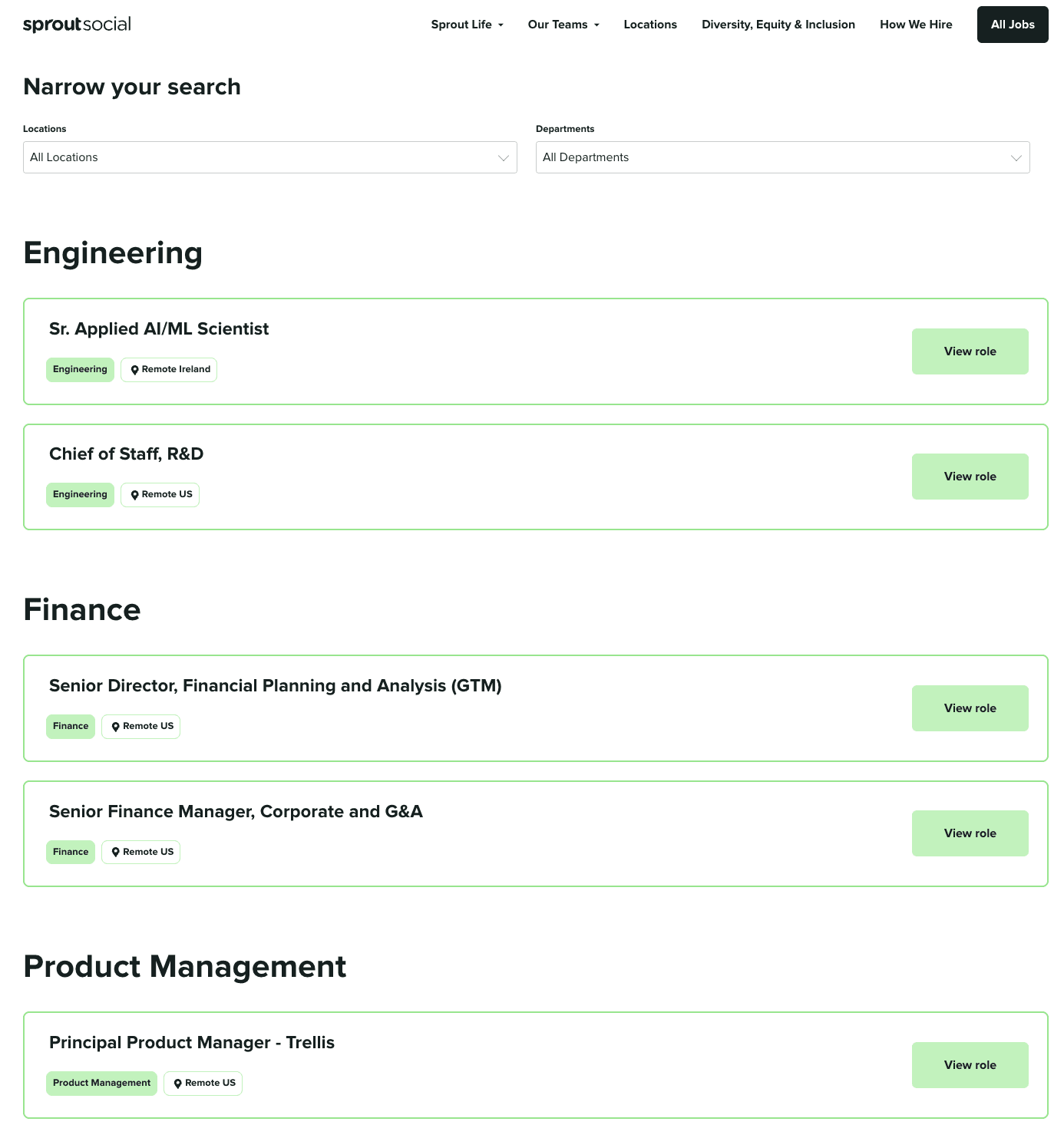
🔔 Change detected on https://sproutsocial.com/careers:
A new job post for Senior Finance Manager, Corporate and G&A was added.
Why a careers page is a signal
Companies telegraph strategy in the roles they open long before a press release. A new VP or Director of Sales points at a go-to-market push. A pile of ML, research, and data-engineering reqs points at an AI bet. Country-specific sales and localization roles hint at a market entry. Finance, recruiting, and ops hires track headcount and funding plans. Leadership titles on the careers page often land weeks before LinkedIn posts catch up. That is hiring intelligence, not clickbait. The rest of this post is how to wire the monitors.
Hiring intelligence, without the setup walkthrough
If you want the product framing first — sitemap new-URL detection, pairing an openings-page monitor, and who uses the signal — start on the hiring intelligence use case. Come back here when you are ready to paste URLs and briefs.
Hiring intelligence monitoring →Two monitor patterns that work
Pick one or both. Each counts as one monitored URL against your plan. Sales uses this to time outreach. Recruiters use it to spot teams in flux. Investors and founders use it as a leading roadmap tell. Same page, different desk.
1. Openings page + natural-language brief
Paste the main careers / openings URL, for example https://sproutsocial.com/careers. Write a brief that says which roles matter and what to ignore. Page Deltas hashes the extracted text first; when the hash changes, an LLM judges the diff against your description. Matching changes become an alert with a plain-language summary plus before/after screenshots. A live-shaped alert looks like: Change detected on https://sproutsocial.com/careers: A new job post for Senior Finance Manager, Corporate and G&A was added. Use this pattern when you care about which roles were added or removed, including freezes and reorganizations that do not always create a brand-new URL you noticed.
2. Careers sitemap.xml for new job URLs
Many careers sites list every job at its own URL and publish those URLs in a sitemap (often under /sitemap.xml or a careers-specific sitemap). Point a monitor at that sitemap. New job URLs are the signal; the title and often the location sit in the slug. A sitemap monitor counts as one URL, the same as a page monitor, so watching a whole careers domain is cheap on the free plan's 10 slots. Use this when the job is "did a brand-new job URL appear?" Pair it with an openings-page monitor if you also want AI-summarized adds/removes on the list view. Two monitors, two briefs, two questions.
How to monitor website changes →Setup: careers alerts in about five minutes
Same path as our quickstart, scoped to hiring.
Create a free account
Sign up at pagedeltas.com/register. No credit card. Free plan: 10 monitored URLs, unlimited checks (best-effort frequency), AI filtering and summaries, Slack / Discord / Teams / email / signed webhooks, unlimited team members, 14-day history. A sitemap counts as one of those ten.
New monitor, paste the exact URL
Click New monitor. Paste the public openings page or the careers sitemap.xml, not the corporate homepage. Public web only; we cannot see pages behind a login (authenticated monitoring is on the roadmap, not a hidden toggle). Confirm in a browser that a sitemap URL actually returns a sitemap, not a marketing 404.
Write the description like a brief
In the product this field is the description. Docs still mark it optional; do not skip it for careers noise. Three pieces: what the page is, what you want to know, what to ignore.
Connect a channel and Send test
Open Channels: Slack, Discord, or Microsoft Teams via an incoming-webhook URL; email (verify the address before it can receive alerts); or a generic webhook signed HMAC-SHA256 (X-Signature: sha256=<hex>). Click Send test on the channel row. Attach the channel to the monitor (or rely on org defaults).
Let the first check run, then use Check now when you edit
A new monitor is due immediately; the first check establishes the baseline. You do not type a poll interval. Cadence is adaptive (active pages more often, quiet ones less; paid plans get priority checking). Check now is the on-demand run after you tighten the brief. You should not expect a "Senior Finance Manager was added" alert on minute one unless the page actually changed between two checks in a way that matches the brief.
Copy-paste sample briefs
Steal the shape. Swap the company and function.
Senior / leadership roles
Competitor careers / openings page. Alert me when a new senior, staff, principal, or leadership role is posted (VP, Director, Head of, Chief). Ignore intern and early-career postings, location-only edits, and re-postings of listings that already existed under a similar title. Summarise the title, level, and location if visible.
ML / AI hiring cluster
Engineering and research careers page. Alert me when new roles appear in ML, machine learning, AI, research, LLM, data science, or MLOps, especially clusters of two or more related reqs. Ignore non-technical roles, pure analytics BI titles unless they mention ML, and cosmetic edits (location string, EEO boilerplate).
Ignore intern reposts and location-only churn
Openings list for competitive intelligence. Alert me when a role is added or removed in Sales, GTM, Product, or Engineering. Ignore internships, student programs, location-only changes, "remote vs hybrid" tweaks with no title change, and clear re-posts of the same req. If a freeze looks likely (several senior roles removed with nothing added), say so.
Sitemap variant (new URLs only)
Public careers sitemap. Alert me when a new job URL appears. Ignore query-string variants and obvious re-posts of the same slug pattern. For each new URL, summarise the role title and location from the slug.
The setup docs
Quickstart
Paste a URL, write the description, pick a channel, and see the first check — the same path as this walkthrough, with UI labels.
Open the quickstart →Filters & descriptions
How to write a brief the LLM can actually judge — with examples that work and ones that do not.
Read the filters guide →Notification channels
Slack, Discord, Microsoft Teams, email, and HMAC-signed webhooks, including how signing works.
Channels docs →What this is not (honest limits)
Paid plans if you outgrow ten URLs: Starter $29 / 150 URLs, Pro $79 / 1,000, Business $199 / 5,000, Scale $499 / 20,000, Enterprise custom. All include AI, screenshots, all five alert channels, unlimited checks, and unlimited team members; paid adds priority checking.
Public pages only
Greenhouse/Lever public boards and company careers sites work when they are publicly fetchable. Login-walled portals and employee-only boards do not. Authenticated monitoring is on the roadmap.
Not LinkedIn Jobs alerts
Page Deltas does not monitor LinkedIn job listings or anything behind authentication. If the signal you care about is a competitor's people posting or changing activity on LinkedIn or X rather than a careers HTML page, that is a different product job. MultiFollow tracks anonymous LinkedIn and X account activity as sales signals.
Not a visual-region picker as the primary UX
The primary path is the natural-language brief. Classic pixel/CSS region tools still win "tell me the banner moved"; we win "tell me when a senior ML role appeared."
Not a full ATS scrape
Sitemap + openings-page monitors surface new URLs and meaningful list changes. We do not claim to parse every application form field.
Frequently asked questions
- Can I get alerts for companies that have no built-in "notify me" button?
- Yes. If the openings page or careers sitemap is public, paste the URL, write a brief, connect a channel. Native job-alert features on the careers site are optional and often missing.
- How is this different from LinkedIn or Indeed alerts?
- Those products alert on roles they indexed, usually for job seekers. This watches the company's own public page for CI, sales, recruiting, and diligence, including removes and freezes your board digest may never mention.
- Does a careers sitemap burn my whole URL quota?
- No. One sitemap monitor = one monitored URL, regardless of how many job links sit inside it.
- Where do alerts go?
- Slack, Discord, Microsoft Teams, email, or a signed webhook. See the notification channels docs for details and signing.
- Is there a free plan?
- Yes. 10 URLs or sitemaps, unlimited checks (best-effort on free), AI filtering and summaries, unlimited teammates, and the same alert channels as paid. No credit card. A sitemap counts as one URL.
Author
Julien, Product Manager at Page Deltas. Pick the rival whose hiring you already refresh by hand. Paste their openings URL or careers sitemap, drop in one of the briefs above, send a test to Slack or email, and wait for the first real match. Tighten the ignore list once. That is usually the whole setup.
Start with one competitor
Free plan, no card. Create an account, paste an openings URL or careers sitemap, drop in one of the briefs above, send a test to Slack or email, and wait for the first real match.