
Guide
How to get website change alerts in Slack
Your team already lives in Slack. Competitor pricing moves, vendor ToS rewrites, and regulator PDF updates still land in email — or in a monitoring dashboard nobody opens until Friday. The job here is simple: when a public page changes in a way that matters, the alert should show up in the channel where you already decide what to do next.
Free plan · 10 monitored URLs or sitemaps · AI included · Slack on every plan · No credit card required
Tell Page Deltas what matters
alert me when the Hubspot pricing changes
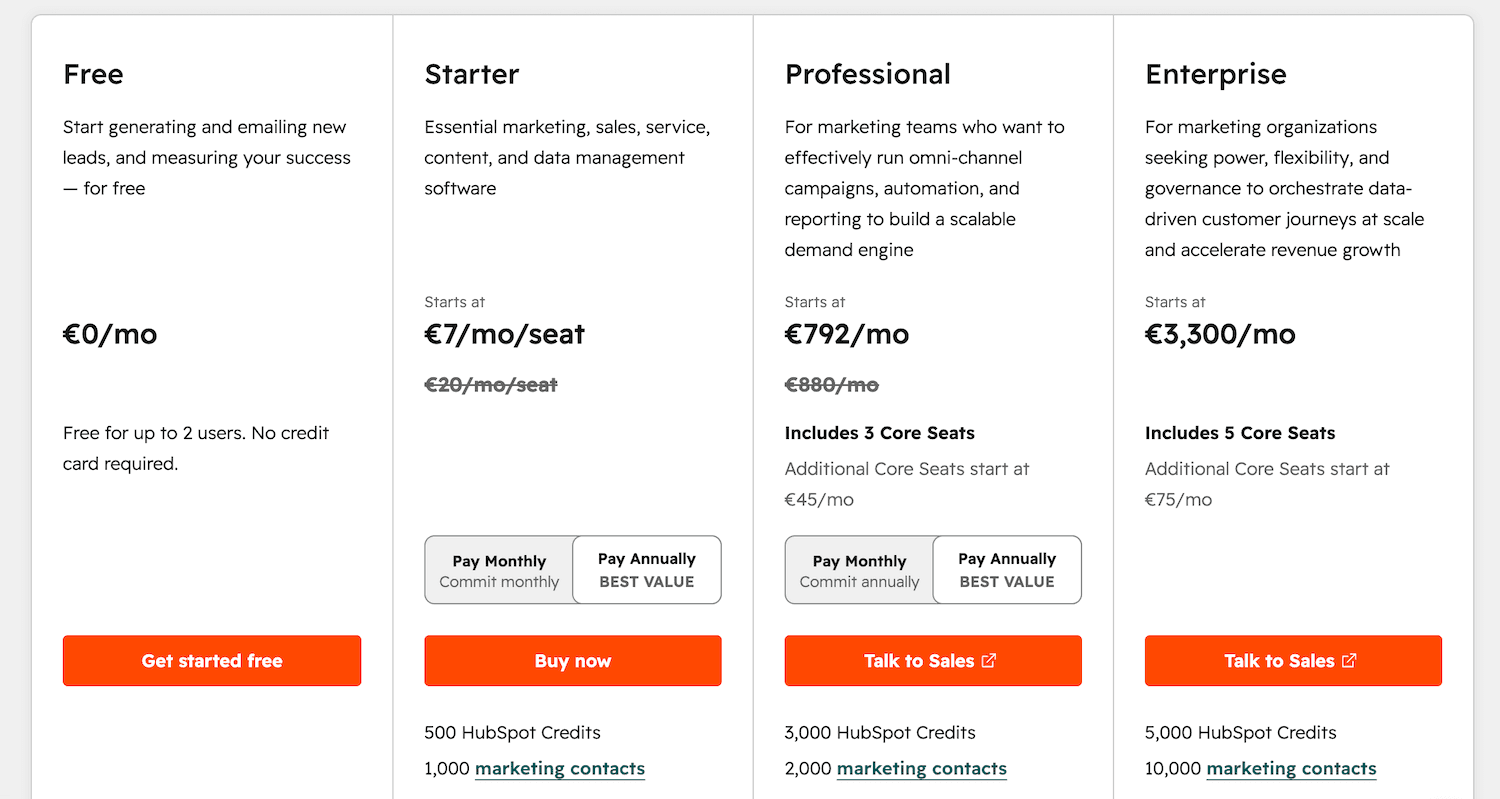
🔔 Change detected on https://www.hubspot.com/pricing:
Price of the Professional plan went up from €749/mo to €792/mo.
Why Slack beats email for website change alerts
Email is fine when one person watches three pages. It falls apart when five people need the same signal, or when the alert has to start a thread, not sit unread. If the alert only needs to hit a CRM, a GRC tool, or a script, use a signed webhook instead. Slack is for humans.
Same channel, same context
Pricing alerts in #competitive-intel, vendor ToS in #procurement, regulator PDFs in #compliance. The desk that owns the decision already sits there.
Thread the response
React, tag the owner, decide in place. The alert is the start of the work, not a redirect to another app.
Searchable history
Slack search becomes a lightweight log of "when did they reprice?" without opening the monitor UI.
Less inbox theater
A channel you already mute on focus days is easier to manage than another newsletter-shaped firehose.
How Page Deltas posts to Slack (vs a visual-diff tool)
Classic website monitors in the Visualping family are built around "something on the screen moved." You pick regions or selectors, they show a highlighted diff, and you still decide whether it matters. Their Slack posts inherit that model: you get notified that a change happened, then you read the evidence. Page Deltas flips the question. You paste a public URL, write a natural-language brief, and an LLM judges whether the change matches what you asked for. The Slack message opens with a plain-language summary plus before/after screenshots — not a wall of redlines you have to interpret at 8am.
Visualping-style path
Authorize a Slack app (often needs workspace admin), pick regions or selectors, set a fixed check interval. Slack inherits the visual/text-diff model.
Page Deltas path
Paste a Slack incoming-webhook URL into Channels, write a brief, leave cadence adaptive. No CSS selector required for the primary workflow. Full plan-for-plan comparison lives on Page Deltas vs Visualping — this post is the Slack wiring.
Page Deltas vs Visualping →Setup: first website change alert in Slack in about five minutes
Same path as our quickstart, scoped to Slack.
Create the Slack channel before the monitor
Make a channel with a job, not a catch-all. Examples that work: #competitive-intel, #vendor-terms, #regulatory-watch, #docs-changelog. One channel per desk beats one mega-channel you mute on day two. Optional but useful: a short channel topic — "AI-filtered page alerts only; thread the response; ✅ = handled."
Create a Slack incoming webhook
In Slack, create an incoming webhook for that channel and copy the URL (https://hooks.slack.com/services/...). You do not need a custom Slack app beyond the webhook. Keep the URL secret; anyone with it can post to the channel.
Create a free Page Deltas account
Sign up at pagedeltas.com/register. No credit card. Free plan: 10 monitored URLs or sitemaps, unlimited checks (best-effort frequency), AI filtering and summaries, unlimited teammates, Slack / Discord / Teams / email / signed webhooks, 14-day history.
Add the Slack channel in Page Deltas
Open Channels in the top navigation → add Slack → paste the incoming-webhook URL → click Send test on the channel row. Do the test. A monitor that is "working" with a channel that never delivers is how people decide the product is broken. You can attach channels per monitor, or leave a monitor unchecked to fall back to the organisation's default channels.
Create the monitor with a real brief
Click New monitor. Paste the exact public URL (HTTPS recommended) — pricing, ToS, docs changelog, careers openings, regulator PDF, or sitemap.xml. Public web only; pages behind a login are not supported yet (authenticated monitoring is on the roadmap). Write the description like a brief, not a search query. Three pieces: what the page is, what you want to know, what to ignore. Example for a pricing page routed to #competitive-intel: "Competitor pricing page (HubSpot). Alert me when any plan price changes, a plan is added or removed, or quotas and limits change (seats, contacts, automation). Ignore cookie banners, layout tweaks, rotating testimonials, and copy edits that do not change price or packaging."
Let the first check run, then wait for a real match
A new monitor is due immediately; the first check establishes the baseline. You do not type a poll interval — cadence is adaptive (active pages more often, quiet ones less; paid plans get priority checking). Check now is the on-demand run after you tighten the brief. You should not expect a "Professional went from €749 to €792" Slack message on minute one unless the page actually changed between two checks in a way that matches the brief. When it does match, Slack gets the summary plus before/after screenshots.
Channel map: which pages go where
Sitemap monitors count as one URL against your plan — useful when the job is "did a brand-new page appear?" rather than "did this page get rewritten?"
#competitive-intel
Typical URLs: pricing, homepage hero, product pages, sitemap.xml. Brief focus: price/tier/positioning moves; new URLs.
#procurement / #vendor-terms
Typical URLs: ToS, DPA, SLA, privacy PDFs. Brief focus: liability, data processing, termination, payment terms.
#compliance
Typical URLs: regulator indexes, guidance PDFs, enforcement pages. Brief focus: new or amended rules in your scope.
#docs-watch
Typical URLs: partner API docs, changelogs. Brief focus: breaking changes, deprecations, new endpoints.
#hiring-signals
Typical URLs: careers openings or careers sitemap. Brief focus: senior / function-specific roles. See the careers guide for the full walkthrough.
Careers page job alerts guide →Copy-paste briefs that keep Slack quiet
Steal the shape. Swap the company names. Vague briefs ("tell me when this changes") recreate a visual-diff firehose inside Slack. That is how channels die.
Competitor pricing → #competitive-intel
Pricing page for competitor X. Alert me when any plan price changes, a plan is added or removed, quotas/limits change, or a public price becomes "contact sales." Ignore cookie banners, A/B layouts, and rotating testimonials.
Vendor ToS / DPA → #vendor-terms
Vendor Terms of Service. Alert me when clauses change around liability, indemnification, termination, data processing, subprocessors, or payment terms. Ignore typo fixes, formatting, nav, and "last updated" bumps with no clause change. Summarise which clause moved and in which direction.
Regulator PDF or rule page → #compliance
Public regulatory document. Alert me when substantive rule text is added, removed, or reworded for [your topic]. Ignore navigation, unrelated notices, and formatting-only edits. Summarise what changed in plain language.
Partner docs changelog → #docs-watch
Public API changelog. Alert me when a new release entry is added, especially breaking changes or deprecations. Ignore typo fixes to old entries. Mention the feature name and one-sentence pitch in the summary.
Keep the channel useful after day one
A Slack channel full of noise dies faster than an empty one. Treat the brief as the product, not the webhook.
One job per monitor
Several specific monitors beat one vague monitor on the whole domain.
Thread + emoji
👀 reviewing, ✅ handled, keeps the main channel scannable.
Edit the brief, don't mute the channel
Noisy alert → open the summary → add an explicit ignore clause → Check now. The new brief applies on the next check, not retroactively.
Default channels vs per-monitor routing
Org defaults for the shared desk; override on monitors that belong in a tighter channel. When Slack is the wrong sink, HMAC-signed generic webhooks exist for GRC tools, bid systems, and internal scripts.
Honest limits
Paid plans if you outgrow ten URLs: Starter $29 / 150 URLs, Pro $79 / 1,000, Business $199 / 5,000, Scale $499 / 20,000, Enterprise custom. AI, screenshots, all five alert channels, unlimited checks, and unlimited team members are included on every tier; paid adds priority checking and longer history.
Public pages only
Greenhouse/Lever public boards, marketing sites, public PDFs, and public sitemaps work. Login-walled portals do not.
Not a visual-regression / defacement tool
If the job is "did this pixel move 20px," a visual-diff product still wins. We strip nav/footer/ads and ask whether the leftover change matches your brief.
Not LinkedIn or X activity
Page Deltas watches the open web. If the signal is a person's LinkedIn or X activity rather than a public HTML page, that is a different job — MultiFollow tracks anonymous LinkedIn and X account activity as sales signals. Keyword mentions across LinkedIn, X, Reddit, and more belong on KWatch.
Cadence is adaptive, not a typed 2-minute poll
Check now is the escape hatch. Higher plans get scheduling priority.
Frequently asked questions
- Can I send different monitors to different Slack channels?
- Yes. Create one Slack incoming-webhook channel per Slack destination (or reuse webhooks carefully), add them under Channels, and attach the right ones per monitor. Leave a monitor's channels unchecked to use org defaults.
- Do I need a Slack workspace admin?
- For a standard Slack incoming webhook, you need permission to create that webhook for the target channel. Page Deltas does not require a full custom Slack app install beyond the webhook URL you paste.
- What does a good Slack alert look like?
- A plain-language summary of what matched your brief, plus before/after screenshots. Example shape: Change detected on https://www.hubspot.com/pricing: Price of the Professional plan went up from €749/mo to €792/mo.
- Is Slack on the free plan?
- Yes. Slack, Discord, Microsoft Teams, email, and signed webhooks are available on every plan, including Free (10 URLs, no credit card).
- How is this different from Visualping's Slack integration?
- Visualping's Slack flow is built around visual/text diffs and often a Slack app authorization plus fixed check intervals. Page Deltas uses a natural-language brief, AI filtering/summaries on every plan, adaptive cadence, and a Slack incoming webhook. Full comparison: Page Deltas vs Visualping.
Author
Julien, Product Manager at Page Deltas. Pick the one URL you already refresh before standup. Create the Slack channel, paste the incoming webhook, write the sentence you'd send a teammate, hit Send test, and wait for the first real match. Tighten the ignore list once. That is usually the whole Slack setup.
Start with one page in Slack
Free plan, no card. Create an account, connect a Slack incoming webhook, paste the URL you already babysit, drop in a brief from above, and send a test to the channel the team already sits in.